C# - Qiita Advent Calendar 2025 - Qiita に参加しています。
4日目の記事です。
WPFつかってますか?!
Visual Studioではデザインビューといって、WPF の画面を 視覚的に作成・調整するためのビューがあります。
UIのレイアウトだけではなく、サンプルデータも表示させることができる優れモノです。
このサンプルデータですが、みなさんデザイン時のデータはどうしているでしょうか?
DataContext を定義して設定していますか?
DataContext を直接設定したり、
<Window xmlns:local="clr-namespace:WpfApp1">
    <Window.DataContext>
        <local:ViewModel/>
    </Window.DataContext>
</Window>
デザイン属性を使うことができます。
<Window xmlns:local="clr-namespace:WpfApp1"
			xmlns:x="http://schemas.microsoft.com/winfx/2006/xaml"
			xmlns:d="http://schemas.microsoft.com/expression/blend/2008"

			d:DataContext="{d:DesignInstance local:ViewModel}"
			d:DataContext="{d:DesignInstance {x:Type local:ViewModel}}"
			d:DataContext="{d:DesignInstance {x:Type local:ViewModel},IsDesignTimeCreatable=True}"
/>
このデザイン属性で、自分の好きな値のデータを表示したいですよね!
なんと d:DataContext に Static のインスタンスを渡すことができるんです。
書き方も簡単です。
<Window xmlns:r="clr-namespace:WpfApp1.Resources"
			d:DataContext="{x:Static r:design.MainWindowViewModel}" />
なので、適当なStaticプロパティを作って d:DataContext に渡してあげればOKです。
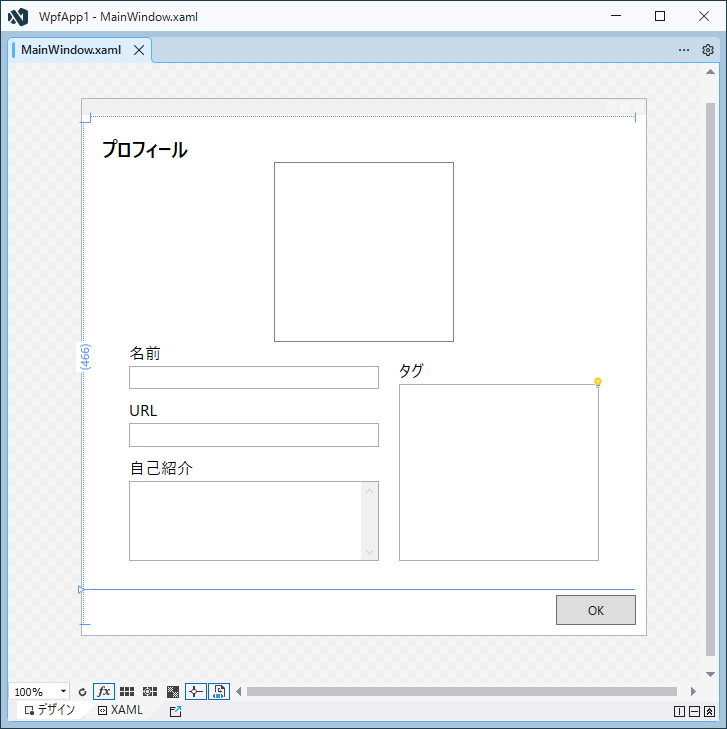
サンプルのためにこんな画面を用意しました。
渡した ViewModel のプロフィールデータを表示する画面です。
サンプルデータが無いと、何もなくて分かりづらいです。
<Window x:Class="WpfApp1.MainWindow"
		xmlns="http://schemas.microsoft.com/winfx/2006/xaml/presentation"
		xmlns:x="http://schemas.microsoft.com/winfx/2006/xaml"
		xmlns:d="http://schemas.microsoft.com/expression/blend/2008"
		xmlns:mc="http://schemas.openxmlformats.org/markup-compatibility/2006"
		Title="{Binding Title}"
		SizeToContent="WidthAndHeight"
		SnapsToDevicePixels="True"
		mc:Ignorable="d">

	<Grid Margin="10">
		<Grid.RowDefinitions>
			<RowDefinition Height="Auto" />
			<RowDefinition Height="*" />
		</Grid.RowDefinitions>

		<Grid Margin="10">
			<Grid.RowDefinitions>
				<RowDefinition Height="Auto" />
				<RowDefinition Height="Auto" />
				<RowDefinition Height="*" />
			</Grid.RowDefinitions>

			<TextBlock FontSize="20"
					   FontWeight="Bold"
					   Text="プロフィール" />
			<Border Grid.Row="1"
					Width="180"
					Height="180"
					HorizontalAlignment="Center"
					BorderBrush="Gray"
					BorderThickness="1">
				<Image Source="{Binding Image}" />
			</Border>

			<Grid Grid.Row="2"
				  Margin="0,0,0,20"
				  HorizontalAlignment="Center"
				  VerticalAlignment="Top"
				  TextElement.FontSize="16">
				<Grid.ColumnDefinitions>
					<ColumnDefinition Width="Auto" />
					<ColumnDefinition Width="*" />
				</Grid.ColumnDefinitions>

				<StackPanel Width="250"
							HorizontalAlignment="Left">
					<TextBlock Margin="0,0,0,3"
							   Text="名前" />
					<TextBox Text="{Binding Name}" />

					<TextBlock Margin="0,10,0,3"
							   Text="URL" />
					<TextBox Text="{Binding URL}" />

					<TextBlock Margin="0,10,0,3"
							   Text="自己紹介" />
					<TextBox Height="80"
							 AcceptsReturn="True"
							 HorizontalScrollBarVisibility="Disabled"
							 Text="{Binding Description}"
							 TextWrapping="Wrap"
							 VerticalScrollBarVisibility="Visible" />
				</StackPanel>

				<Grid Grid.Column="1"
					  Margin="20,18,0,0">
					<Grid.RowDefinitions>
						<RowDefinition Height="Auto" />
						<RowDefinition Height="1*" />
					</Grid.RowDefinitions>

					<TextBlock Margin="0,0,0,3"
							   Text="タグ" />
					<ListBox Grid.Row="1"
							 Width="200"
							 ItemsSource="{Binding Items}" />
				</Grid>
			</Grid>
		</Grid>

		<Button Grid.Row="1"
				Width="80"
				Height="30"
				HorizontalAlignment="Right"
				VerticalAlignment="Bottom"
				Content="OK" />
	</Grid>
</Window>
ViewModel の定義はこんな感じに
using System.ComponentModel;
using System.Runtime.CompilerServices;

namespace WpfApp1;

public class MainWindowViewModel : ViewModel {
	public string? Title { get; set => SetProperty( ref field, value ); }

	public string? Image { get; set => SetProperty( ref field, value ); }

	public string? URL { get; set => SetProperty( ref field, value ); }

	public string? Name { get; set => SetProperty( ref field, value ); }

	public string? Description { get; set => SetProperty( ref field, value ); }

	public List<string>? Items { get; set => SetProperty( ref field, value ); }
}

public class ViewModel : INotifyPropertyChanged {
	public event PropertyChangedEventHandler? PropertyChanged;

	protected bool SetProperty<T>( ref T field, T newValue, [CallerMemberName] string? propertyName = null ) {
		if( !Equals( field, newValue ) ) {
			field = newValue;
			PropertyChanged?.Invoke( this, new PropertyChangedEventArgs( propertyName ) );
			return true;
		}

		return false;
	}
}
ここにデザイン用データを作成します。
適当に design クラスにしました。
リリース時に残っていると恥ずかしいので #if DEBUG で囲っておきます。
※クラス定義後に一度Visual Studioでビルドをかけること
namespace WpfApp1.Resources;  // Resources に作成しています

#if DEBUG // DEBUG時だけ有効
public static class design { // クラス名はわかれば何でも良い
	public static MainWindowViewModel MainWindowViewModel { get; } = new() {
		Title = "プロフィール",

		Image = "Resources/kttFoxIcon.png",
		URL = "https://kttfox.hatenablog.jp/",
		Name = "kttFox",
		Description = "C#大好き\nWindowsアプリケーション(WPF)をよく作っています!",
		Items = [
			"C#",
			".NET",
			"Visual Studio",
			"WPF",
			"Windows Forms"
		]
	};
}
#endif
d:DataContext を設定します。
WpfApp1.Resources の名前空間にクラスを作ったので、こちらも追加。
<Window x:Class="WpfApp1.MainWindow"
		xmlns="http://schemas.microsoft.com/winfx/2006/xaml/presentation"
		xmlns:x="http://schemas.microsoft.com/winfx/2006/xaml"
		xmlns:d="http://schemas.microsoft.com/expression/blend/2008"
		xmlns:mc="http://schemas.openxmlformats.org/markup-compatibility/2006"
		xmlns:r="clr-namespace:WpfApp1.Resources"
		Title="{Binding Title}"
		Width="564"
		Height="536"
		d:DataContext="{x:Static r:design.MainWindowViewModel}"
		SnapsToDevicePixels="True"
		mc:Ignorable="d">
画像ファイルも表示できて、好きなサンプルデータで表示できました。
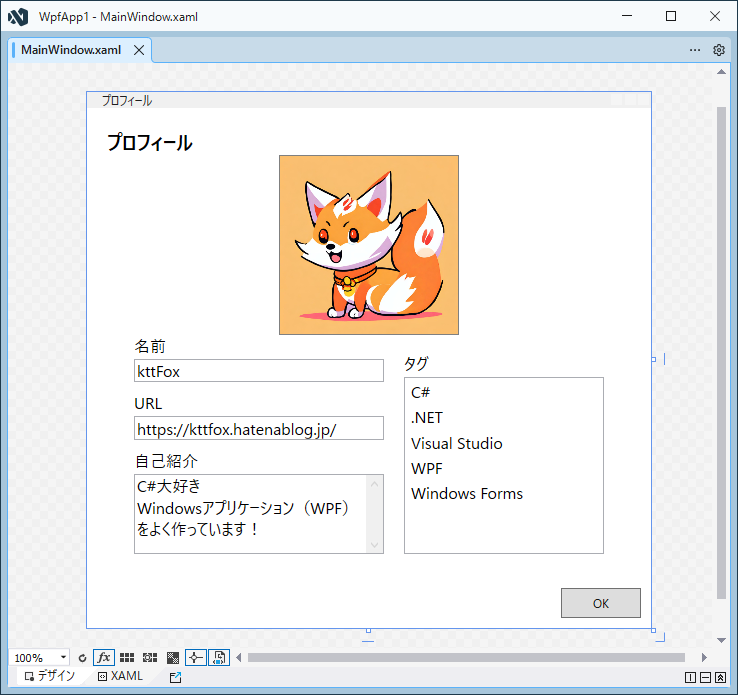
みなさんもデザイン表示を見ながら画面設計してください!
この記事のソースコード
https://github.com/kttFox/Qiita_AdventCalendar2025


